


WEEKLY
SPENDING RECAP
A passive financial check-in feature for Chase that helps everyday users understand their spending without stress, setup, or judgment.
What?
A weekly spending recap feature added to Chase's mobile app to help users understand their finances through passive, plain-language summaries with no setup or budgeting tools required.
For who?
Designed for everyday Chase users. Especially paycheck-to-paycheck users and ESL users who want clarity and reassurance without complexity.
My role
UX/UI designer responsible for user research, interviews,persona development, wireframing, prototyping, and usability testing.
Project Duration
4 weeks

Tools
Figma — Usability Testing — Interview Synthesis
What Chase needs
A feature that increases weekly engagement, builds trust in the app, and reduces anxiety-driven support calls without requiring users to set up budgets or configure anything.
What users need
To know if something went wrong. To understand what changed. To avoid surprises. To feel in control without having to dig through data to get there.
Flow 1 — Normal spending
Your spending is right on track
When spending is within usual range, users get a category breakdown, a week-over-week trend, and plain-language reassurance. The recap ends with an optional path to the Spending Planner but it's never required.

Flow 2 — Above-usual spending
Spending spiked.. here is why
When spending is higher than usual, the messaging shifts tone without alarming the user. It names the category, gives context, and offers optional charge review or dispute paths — all calmly.
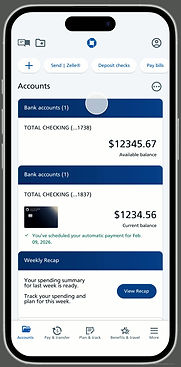
Charge Review and Dispute
Investigate without leaving the recap
Users can drill into any charge, confirm it looks right, or initiate a dispute — all from within the recap flow. Both paths are clear and supportive, with easy return paths back to the summary.

How I did it
5 interviews. 1 important pivot.
I conducted multiple rounds of user interviews with five participants across different financial profiles. From hyper-engaged daily checkers to monthly-only ESL users.
Nancy
Paycheck-to-paycheck. Relies on text alerts. Avoids the app when anxious.
"Don't let me get surprised."
Martha
Intentional planner. Tracks weekly. Experiences stress around
big spending moments.
"Help me stay disciplined."
Ryan
Checks Chase 2–3x daily. Googles merchant codes. Frustrated by vague labels.
"Make this smarter."
Nate
Schedule-based. Spreadsheet user. Rarely confused but
dislikes vendor changes.
"Just let me control it."
Sindy
ESL user. Monthly checker. Focused entirely on bill confirmation.
"Just make sure my bills are paid."
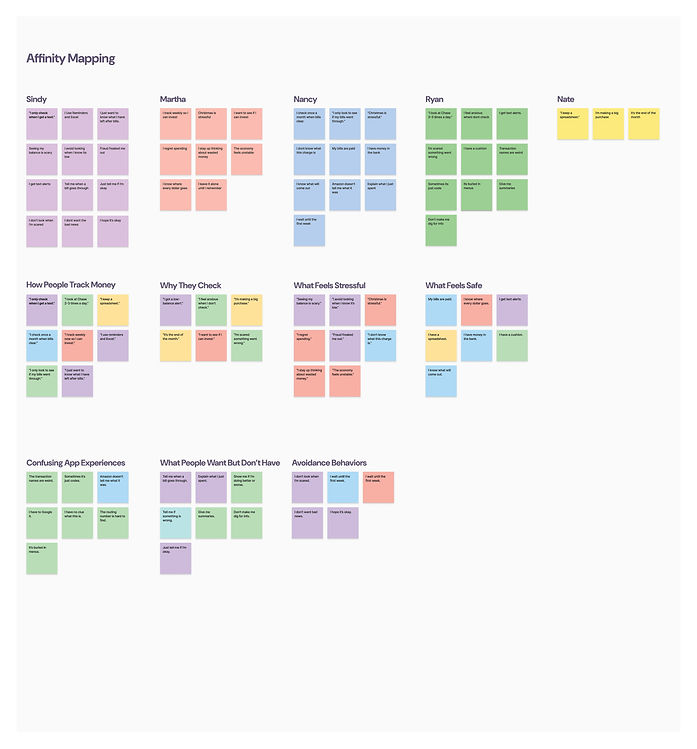
Personas
Three personas emerged from research, each representing a distinct relationship with financial anxiety and app engagement. Despite their differences, all three needed the same thing: clarity and reassurance — not more features.
Naomi Rivera
Paycheck-to-paycheck · 34 · NJ
Monitors constantly but it causes stress, not confidence. Avoids checking when money is low.
Needs emotional safety, not budgeting tools.

Lo-Fi Wireframes
Two lo-fi iterations established the flow structure and fixed an early navigation problem before any visual design was applied.
V1. Core flow established
Mapped the 4-screen primary flow and alt flows for charge review and dispute. Navigation used small arrow icons — low affordance, easy to miss.

V2. Navigation fix + content refinement
Replaced icon buttons with explicit labeled CTAs: "Next" and "View Charges." Category label on Screen 2 refined from Food → Travel to better reflect a realistic scenario.

Usability Testing
Two lo-fi iterations established the flow structure and fixed an early navigation problem before any visual design was applied.
Task
Enter the weekly recap
Understand weekly spending summary
Review what changed and why
Review and verify a specific charge
Exit the recap and return to accounts
Result
✓ Completed without help
✓ Completed
✓ Completed
✓ Completed
✗ Inconsistent — critical gap
I feel more in control when I see this laid out.
— Nancy
I'm usually stressed about money, but this makes sense and feels accurate.
— Danny


Critical fix
"Back to accounts" added persistently to every screen in the flow.
Added
User Flow 2 designed for above-usual spending with distinct tone and messaging.
Refined
Charge review screen expanded to show two stacked charge cards for more context.